Showing posts with label secure. Show all posts

Saturday, 27 October 2012

‘Password’ tops list of most common passwords


Want to guess someone's password? Try ‘password’, researchers have claimed.


    According to an annual study of the most commonly used passwords researchers have found that ‘password’, ‘123456’, ‘qwerty’ and ‘12345678’ are still the most widely used - despite years of security experts urging people to change them to secure options, reported the Daily Mail. The latest list comes following 12 months of high profile hacks that have revealed user passwords. The bad old choice is the culprit that Yahoo, LinkedIn, eHarmony, and Last.fm have suffered major breaches.

     Just in time for Halloween comes something that might scare anyone who spends a lot of time online - SplashData's annual list of the most common passwords used on the Internet and posted by hackers. Researchers said, “Users of any of these passwords are the most likely to be victims in future breaches.”

    However, some people have updated their passwords, and the research found new entries to this year's list include different, but not really creative alternatives like ‘welcome’, ‘jesus’, ‘mustang’ and ‘password1’. SplashData’s top 25 list was compiled from files containing millions of stolen passwords posted online by hackers.

    If you found the above montioned password(s)' a key to unlock your online world, then it's high time you migrate to a new gate pass. This post from Teqknow might help you save the Day.

Friday, 24 August 2012

Essential Password Safety Tips


Your password is the first line of defense against cyber attacks. With phishing, identity theft and other Internet crimes becoming more frequent everyday, it is important to choose a password that cannot be easily guessed or deduced by others. An ideal password is one that is easy to remember, hard to forget, and harder to crack. You can create a good password by following the Teqknow tips offered below

  • Create unique paswords

When you use the same password on multiple websites you are at risk of having hijackers figure out and steal your password from a less secured website and use it to access other important online accounts. Use unique passwords for your accounts, especially the more important ones like those for e-mail and online banking.

  • Change password often


Even if you are using a hard-to-guess password, it is not impossible for a hacker to crack the password, it will just take him more time. A hacker can keep accessing your account or network as long as the password is valid. Updating your password regularly, will significantly limit the utility of that password to the hacker. This is why you should change your passwords periodically.


  • Combine letters, numbers, and symbols

By combining numbers, symbols and both lower and upper case letters in your password you make it a lot more difficult for others to guess or crack your password. This might blow your mind but, Did you know that an 8-character password with numbers, symbols, and mixed-case letters has more than 6,000,000,000,000,000 possible variations? :O


  • Keep it in a secret place


Never leave your password written on notes at your computer or desk. Anyone walking by can easily steal and use it to access your accounts. If you want to save your passwords in a file on your computer, make sure to use a unique name for that file that does not reveal what type of information is contained in the file. You must avoid obvious names such as "My Passwords" when naming a file. Another solution is to use a password manager, a software that helps a user organize passwords and PIN codes. There are many of these available as a desktop software, portable applications, or web based service. Spend some time researching them, checking their reputation, and reading reviews. The time and effort you invest in researching them will help you select the one that best suits your password-security needs.


  • Use a phrase acronym

You can create an acronym with the first letters of the words in a phrase or sentence and use it in a password. For example, from the sentence "Johnny, Johnny, Yes, Papa, Eating sugar? No, Papa", you would get "jjypesnp". Using an acronym makes the password easy to remember but difficult to guess.


  • Keep recovery options updated and secure

Keep any e-mail address you use for recovering and resetting your password updated. The same goes for any phone number that you use to receive password reset codes by text message. There are also many websites that let you choose a question to verify your identity if you ever forget your password. Make sure to create a question-answer combo that only you know and can't be guessed from information already posted online. You can also make your answer unique by typing it in an unusual way so others won't be able to enter the answer properly.


  • Make it hard for others to guess

Always create a password that is unrelated to your personal information. Don't use simple words like "password" or "letmein,"or keyboard patterns such as "qwerty", or sequential patterns such as "abcd1234", which would make your password easier to guess. Choose a random word or phrase, and insert letters, numbers, and symbols into the beginning, middle, and end to make it much more difficult to guess.

  • Add extra measures of security


Another way you can add an extra layer of security is by enabling a 2-step verification process. Although, not all Internet accounts provide this option, some like Google do. The 2-step verification process requires you to have access to your phone, your username and password to sign in. If someone else steals your password, they can't sign in to your account because they don't have your phone. You are now protected with something that only you know and something that only you have, your pasword and your phone.


  • Never ever share your password with anyone

You know this, right? ;)

We hope the information in this article helps you protect your password and online accounts.


Monday, 28 May 2012

Break and Make Files using FFSJ


Worried about freeing up huge swaths of space on a storage medium?
Giving up on emailing an attachment just because it’s just too big?
With FFSJ (The Fastest File Splitter & Joiner), you’ll never have to...


What is FFSJ


FFSJ is a small utility tool which consists of a Splitter and a Joiner, thus letting you split files into multiple smaller parts, then join them up again just like the whole Original. You may use FFSJ to split any file into as many parts as you need to, then continue doing what you usually do! It works on any type of file, whether you’re working with documents, text files, spreadsheets, presentations, audio, video or even executables! And the best part of the story, FFSJ is only a single .EXE file which does not need to be installed, you can directly run FFSJ by double-clicking FFSJ.exe

Features

Very fast: FFSJ can optimize disk-cache and memory usage, this makes FFSJ 3-5 times faster than HJ-Split, WinSplit, MasterSplitter in both splitting and joining tasks. Of course, it is much faster than any compression program.
Simple: FFSJ works well on all Windows platforms. It doesn't need any requirement of installations or complicated DLLs.
Small: FFSJ is small enough to fit on a floppy disk.
Easy to use: FFSJ has a friendly user-interface, it can be used to split any file.
Easy to be integrated: Since v3.0, FFSJ published its command-line interface. End-users can split/join multiple files using a .BAT file. Developers can write their own interface (in any language) to perform splitting/joining tasks from their applications.
Secure: FFSJ uses an advanced encryption algorithm to make your data much more secure from unauthorized access. Since v2.9, MD5 checksum algorithm has also been integrated to verify data integrity.
Compatible: FFSJ can join parts produced by HJ-Split.

How to use FFSJ

How to split a file?

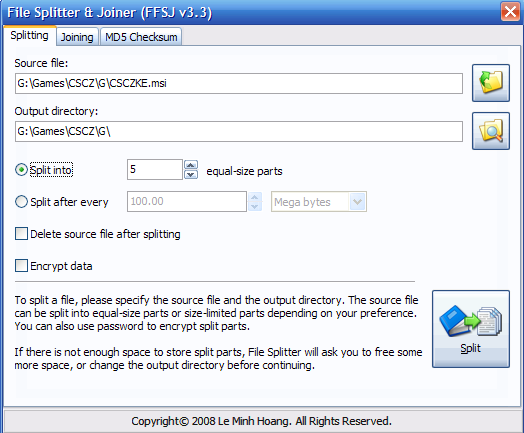
1. Open FFSJ.exe and switch to the "Splitting" tab.


2. Select the source file.


3. Change output directory, number of split parts, part limit and set the other parameters as
    per your need.
     (Just mark the "Encrypt data" checkbox while setting your preferences to apply password to the split parts.)


4. Click the "Split" button, enter your password and click "OK" (if chosen) and wait till the 
    File Splitter completes the job.


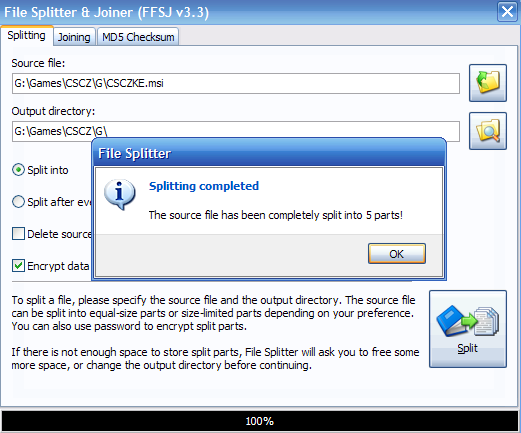
5. You will see the message


You are DONE with Splitting of file....


How to join split parts together?


1. Open FFSJ.exe and switch to the "Joining" tab.


2. Select the first split part (.001 or .__a file). 
    (All split parts must have the same name, except for their extensions - .001, .002, .__a, .__b, etc.)


3. Check the list of split parts from drop-down list.


4. Change output file, specify if your split parts are in different locations, choose if you want   
    to delete the split files after joining is done through specified parameters.

5. Click "Join" button, enter the password if required and wait till the File Joiner completes 
    the job.


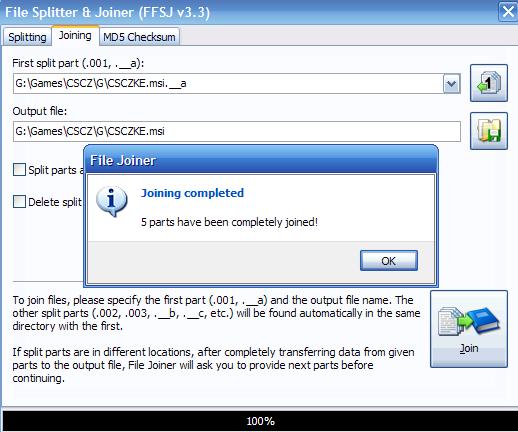
6. You will now see the message


Voila!!! You have the original whole piece of file with you...